0.2: Get the Course & Start
- Time to Complete: 5 minutes
- Prerequisites: Claude installed (0.1)
Get the Course Materials
This course uses the Claude Desktop app. Open Claude, start a new project, and paste this prompt:
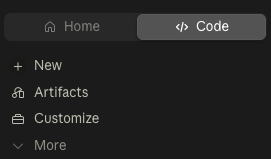
In the Claude Desktop app, click the Code tab (upper left), start a new project, and paste:
Claude installs the FSPM CLI, pulls the course materials into your project, and tells you how to begin.
Start Your First Lesson
Once the course materials are installed:
/start-1-1Claude will begin teaching you interactively. Follow along and respond when prompted.
Prefer the Terminal? (Claude Code CLI)
The course works the same in the CLI:
- Create a course folder and open a terminal there:
mkdir -p ~/Documents/cc4e-course
cd ~/Documents/cc4e-course
claude- Paste the same prompt from above
Don’t have the CLI yet? The Claude Code CLI guide covers install, sign-in, and troubleshooting.
Important: Claude only sees files in the folder where you launch it. Always start Claude Code from the course folder.
Common Questions
”Can I put the course anywhere?”
Yes. Any project (or any folder, on the CLI) works - just start Claude from the same place each time.
”What if the install fails?”
Tell Claude what error you see - it can usually fix its own setup. The CLI itself lives at fullstackpm.com/cli.
”Can I pause and come back later?”
Yes! Use /resume to pick up where you left off, or just run the lesson’s /start command again.
What’s Next
Type /start-1-1 inside Claude to begin Module 1!
Or continue reading the reference guides: 1.1: Course Introduction →
About This Course
Created by Carl Vellotti. Feedback welcome on X or LinkedIn.
Join the community at fullstackpm.com/cc4e.