Mini Lessons
Ross Mike Workflows
What This Is
An interactive version of Greg Isenberg’s interview with Ross Mike, where Ross breaks down how he gets consistently great results from Claude Code.
Source: Claude Code Clearly Explained (and how to use it)
What You’ll Learn
- The “Ask User Question” technique - a prompt that transforms vague ideas into detailed plans
- Why your plan matters more than your tools - stop blaming MCP and fix your inputs
- Four practical rules - context management, earning automation, and building with taste
Watch the Source
Get Started
This lesson runs in the Claude Desktop app. Open Claude, start a new project, and paste this prompt:
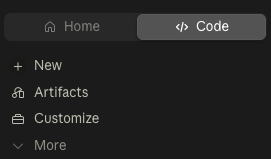
In the Claude Desktop app, click the Code tab (upper left), start a new project, and paste:
Once the lesson materials are installed, type /start-lesson.
Prefer the terminal? Open Claude Code in a new folder and paste the same prompt. See the Claude Code CLI guide for setup help.
What’s Covered
1. The “Slop In, Slop Out” Problem
Ross Mike’s core philosophy: your input quality dictates your output quality. If Claude produces mediocre results, it’s not the model’s fault - it’s your plan.
Most people give Claude vague prompts like “Build me a TikTok UGC app” and wonder why the output is generic. The model has to guess hundreds of decisions: What features? What UI style? What tech stack? Every guess compounds into something you didn’t want.
2. Bad Plan vs Good Plan
The lesson shows a side-by-side comparison:
Bad plan: One vague sentence with no details.
Good plan: Broken into specific features, each with acceptance criteria and tests. UI decisions made. Technical trade-offs resolved.
Same idea, completely different level of detail. The good plan produces good output because Claude isn’t guessing anymore.
3. The Ask User Question Technique
This is the key technique from the video. Instead of writing your plan and hoping it’s detailed enough, you use this prompt:
“Read this plan file. Interview me in detail using the ask user question tool about literally anything - technical implementation, UI/UX concerns, and trade-offs.”
This forces Claude to ask YOU questions before building. Questions like:
- “What’s your ideal workflow - step-by-step wizard or open dashboard?”
- “How should we handle API costs?”
- “What UI style - minimal, dashboard-heavy, or chat-first?”
By answering these questions, you make the decisions. Claude stops guessing. The result is a detailed PRD that actually produces what you want.
4. Don’t Obsess Over MCP and Tools
When your output sucks, you might think “I need more tools - MCP servers, custom skills, plugins.”
Ross Mike’s response: “I can almost guarantee you these things are not the reason why your product isn’t working. Most of the time? Your plan sucks.”
The fix is almost never more tools. It’s a better plan.
5. The 50% Context Rule
As conversations get longer, Claude starts to “deteriorate” - forgetting instructions, repeating itself, making mistakes it wasn’t making before.
Ross Mike’s rule: Never let context usage exceed 50%. When you hit 40-50%, start a fresh session. Summarize your progress, paste it into the new session, and continue.
Think of it like a professor dumping information on you for hours - at some point you’d start forgetting stuff too.
6. Earn the Right to Automate (Ralph Loops)
You’ve probably heard about “Ralph loops” - automated workflows that build entire apps while you sleep.
Ross Mike’s advice: Don’t use them yet.
His analogy: “Imagine not knowing how to drive, but buying a Tesla for self-driving. Cool in theory, but maybe learn to drive first.”
When you build manually - one feature, test it, next feature - you develop what Ross calls “vibe QA testing.” You learn the rhythm. You know when something feels off. If you automate before you have that instinct, you won’t know how to fix things when they break.
His rule: Deploy something manually first. Then you’ve earned the right to automate.
7. Audacity Over Syntax
There are tons of “I cloned a $4 billion app” tutorials. But Ross and Greg argue that’s not what works anymore.
“Software development is starting to become easy. But software engineering - making things usable, creating great UX, having taste - that’s hard.”
If everyone can clone the same features, what makes software different? Audacity.
Ross shared an example: an app that generates running routes based on your mood. The animations, the colors for different emotions - that required thought. That’s what stands out.
Don’t just build features. Build something with taste.
By the End
You’ll have:
- The Ask User Question prompt to reuse on any project
- Your own detailed PRD
- Five rules for working with Claude Code effectively
Get the lesson: scroll up to Get Started - one pasted prompt installs everything.